Listen to the brief overview
The direct answer
Text to Pay gives a business another way to request payment when the customer is not standing at a register. The merchant sends a payment request through the supported system. The customer receives a text, follows the link on a smartphone, and uses the secure payment page provided through the service.
For the right CSRA business, that can remove an unnecessary trip back to the office, a phone conversation where card details might otherwise be handled poorly, or days of waiting for a paper check.
It does not guarantee that a customer will pay. It does not replace a clear estimate, signed agreement, deposit policy, invoice, or collection process. It simply makes the payment step easier to reach on the device many customers already have in hand.
Strong local use cases
Auto repair and mobile mechanics
A repair shop may finish the vehicle after the customer has returned to work. A mobile mechanic may complete service in a driveway. Text to Pay can provide a convenient route for the approved balance without asking the customer to return solely to present a card.
Lawn, cleaning, and home services
The homeowner may not be present when recurring lawn work, cleaning, pressure washing, pest service, or a small repair is completed. A text request can connect the completed visit to a payment path, provided the business has already communicated the work, amount, and terms.
Contractors and project deposits
Some trades collect a deposit before materials are ordered or a scheduled phase begins. Text to Pay may support that request, but the text itself is not the contract. The scope, cancellation terms, milestones, and authorization should already be clear.
Medical, dental, wellness, and professional offices
A customer or patient may owe an approved balance after leaving the office. Text to Pay may offer a convenient payment option. Businesses in regulated fields still need their own privacy, recordkeeping, communication-consent, and compliance review. A payment vendor’s security feature does not make every message or workflow automatically compliant.
Beauty and appointment-based services
Mobile beauty professionals, photographers, trainers, and event-service providers may use a payment request for a deposit or final balance. The business should distinguish a payment request from an appointment confirmation and should make refund and cancellation policies visible before payment.
What NMI says the service can do
NMI describes its Text-to-Pay extension as a payment channel that allows merchants to initiate conversations, send invoices, receive payments, and issue receipts through text-based interactions. NMI also says customers do not need a new app or password and that the service uses its payment-security environment.
Those capabilities still depend on the service being enabled for the merchant and configured correctly. Marketing statistics on NMI’s product page describe vendor-reported behavior across a broader market; they are not proof that a specific Augusta business will collect money a certain number of times faster.
A responsible Text to Pay workflow
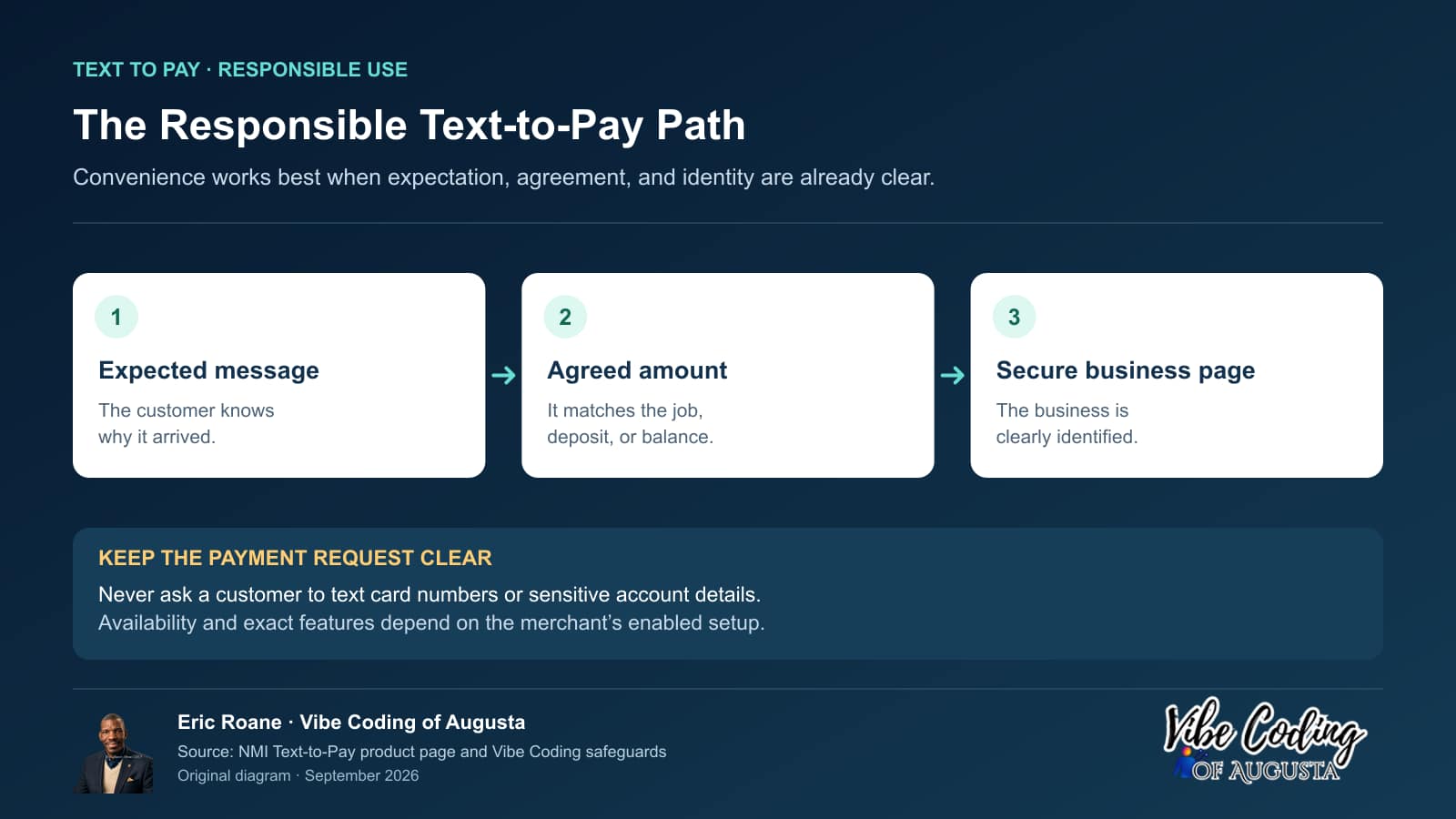
- Confirm that the customer expects the request and that the business has permission to use the phone number for the applicable communication.
- Identify the business clearly in the message and on the payment page.
- Connect the request to an agreed service, invoice, deposit, or balance.
- Avoid placing sensitive medical, financial, or unnecessary personal details in the text.
- Let the secure payment page handle card or bank information. Do not ask customers to text card numbers.
- Reconcile the successful payment in the merchant portal or connected records before marking the balance paid.
- Keep refunds, disputes, receipts, and customer questions connected to a human support path.
Questions to ask before adding it
- Is Text to Pay enabled for this merchant account and payment configuration?
- What written fees apply to the service and to the underlying transaction?
- Can the request display the business’s name and clear contact information?
- What payment methods can the customer use in the merchant’s approved setup?
- How are receipts, partial payments, refunds, failed attempts, and disputes handled?
- Which staff members can send requests, and how are permissions controlled?
- How does the business document customer consent and honor communication preferences?
- Does the payment status connect to the business’s invoice, job, booking, or customer records?
When Text to Pay is not enough
Text to Pay is not a replacement for electronic invoicing when the customer needs line-item detail, purchase-order references, PDFs, partial-payment tracking, reporting, or formal business records. Automated recurring billing is a separate NMI service. Text to Pay is not a replacement for an online cart when the customer needs to select products and shipping, or for a point-of-sale system when the customer is already at the counter.
It is most useful when the amount is already understood and the missing piece is a convenient, secure path to payment.
The right next step
Text to Pay is positioned as an add-on after a merchant account is open. Begin by reviewing the current processing statement and collection workflow. Then identify the exact moments when a customer owes an agreed amount but is no longer standing in front of the business.
Ask Vibe Coding of Augusta whether Text to Pay fits your collection workflow
Sources
Product features are subject to the merchant’s enabled configuration and written terms.
Why should CSRA service businesses use Text to Pay?
Text to Pay allows CSRA service businesses—such as HVAC, plumbing, and landscaping—to send secure payment links via SMS. This modernizes the collection process in the Augusta market, which may improve convenience and reduce follow-up work when the customer expects the request and the merchant verifies the result.
Grovetown HVAC job: what happens after the technician leaves?
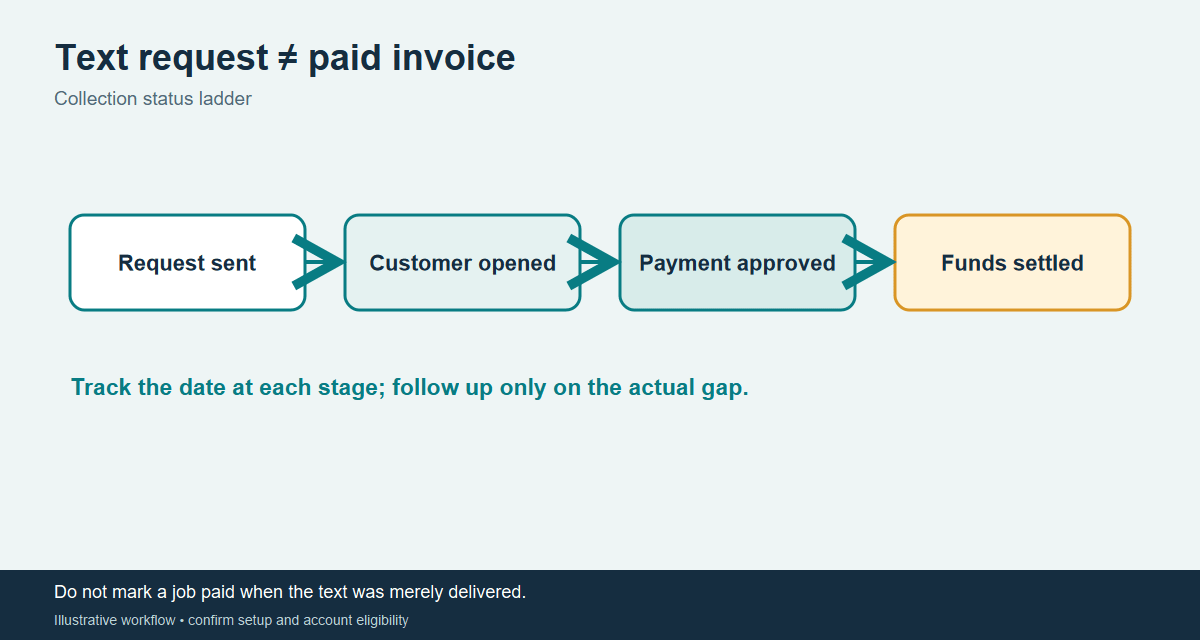
The technician reviews the completed work and exact amount with the homeowner before a text request is sent. Staff confirm the customer’s preferred contact method, send the request through the approved service, and verify the final merchant transaction record. A sent text is not a paid invoice.
Customer question: “How do I know the text is real?” The message should identify the business and job without unnecessary private details. The customer should have a known business number to call independently and should never be asked to reply with a card number, bank account, or one-time code. Offer another payment route when text is unsuitable.
Owner baseline: Record job completion, request date, payment confirmation date, follow-up contacts, and disputed or misdirected requests. If twenty completed jobs each need one manual reminder today, eliminating five reminders would mean five fewer staff contacts. That is an illustrative workload calculation, not a promised collection result.
Training check: Distinguish message sent, customer viewed, payment authorized, and funds settled. Show a trainee how to verify each state in the approved merchant records.
Listen: getting paid faster by text
Steps between a finished job and a payment
Illustrative: the mailed-check path compared with a text link.
Fewer steps can mean less waiting, but results depend on your customers and how you use the tool. Card payments have processing fees.
Ready to look at a merchant account for your business? Start with a short form, and we will walk you through the next steps.